Heat where it’s needed, and proof that it worked.
Spine Valve regulates heating water flow based on measured room temperature. Heat is directed where demand is greatest, spaces heat more evenly and less energy is used, and the heater no longer needs to be left on just in case. Spine heating brings the whole condition management into one view.
Drying continues even after the space is already dry
No one knows for certain when a space has reached its target temperature, so the drier is kept running just in case. If a heater shuts down overnight, it’s only noticed the next morning.
Room temperature is judged by eye or not measured at all, so adjustment is guesswork.
Drying progress isn’t visible, so the schedule is based on estimation.
A shut-down heater or a clogged valve is only found on the next site visit.
When the client asks whether the space dried properly, the answer is a memory-based guess.
Spine heating: how Spine Valve works
A smart control system for temporary heating. Regulates water flow based on measured room temperature, so heat distribution is precise and energy-efficient.
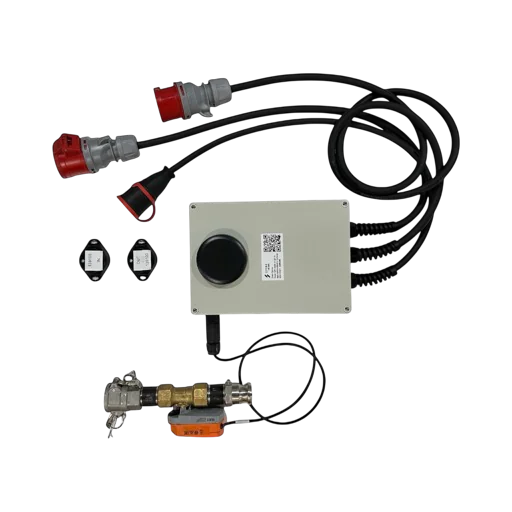
Measured temperature controls the valve
Control is based on continuously measured room temperature. Once a space has reached its target temperature, the valve automatically throttles flow and heat is directed to where it’s still needed.
Practical benefits: more even temperature distribution across the site, lower energy consumption, and better control of conditions for drying and winter heating.
- Control based on measured room temperature
- Automatic water flow regulation via the valve
- Heat is directed to the greatest demand
- More even temperature across the whole site
- Lower energy consumption
- Controlled conditions for drying and winter heating
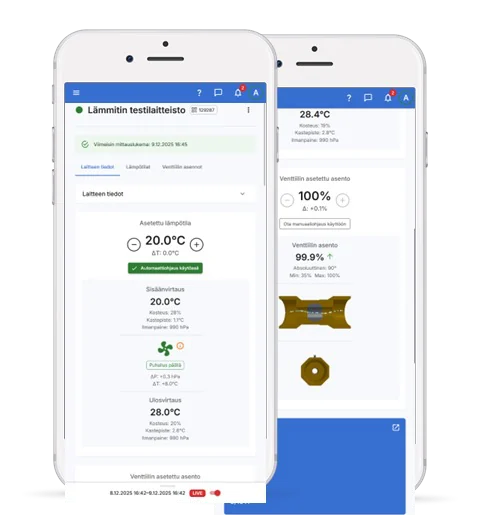
See whether the heater is really working
Alongside the target temperature, the app shows inlet and outlet air temperature and valve position. If a heater is blowing cold air or a valve is open for no reason, it’s visible immediately — not only once drying is already behind schedule.
The same view reports filter condition: when the gap between inlet and outlet air narrows, the filter is clogged. You get a notice before heating output collapses.
- Continuous comparison of inlet and outlet air
- Real-time verification of actual output
- Continuous condition monitoring
- All data logged for documentation and reporting
Spine heating: drying progresses on measurement, not guesswork
Drying time determines when flooring can be laid and the project handed over. When conditions are measured, the schedule can be managed with data, and drying can also be proven.
Temperature and humidity
Wireless sensors continuously measure temperature, relative humidity and air pressure. The sensor attaches with a magnet directly to the heater — no fixed cabling is needed.
Drier control
Driers and heaters can be switched on and off based on conditions or a schedule, so devices don’t run needlessly in an empty space.
Documentation
Spine heating logs all condition data for the whole project. Drying progress can be shown to the client afterwards or included as part of moisture-control reporting.
Heating doesn’t shut down quietly
Alarms arrive by text message and email immediately. Thresholds are configurable by site and work phase.
Plan in the office
The heating plan is prepared in advance in the app: heaters are created and dragged onto the floor plan in their correct positions.
Install the valve
The valve goes on the flow or return line, and the heater’s output is looped through the unit. 1″ Camlock connections in both directions.
Scan the QR code
The installer sees the plan on their phone in real time, selects the heater and scans the code. The device pairing happens automatically.
Set the target temperature
Turn on automatic control, set the target temperature. From then on Spine regulates flow itself and alerts you to deviations.
Spine for heating and conditions
Spine Valve regulates heating water flow based on measured room temperature. Add the product to the quote cart, and we’ll get in touch with a quote for your site.
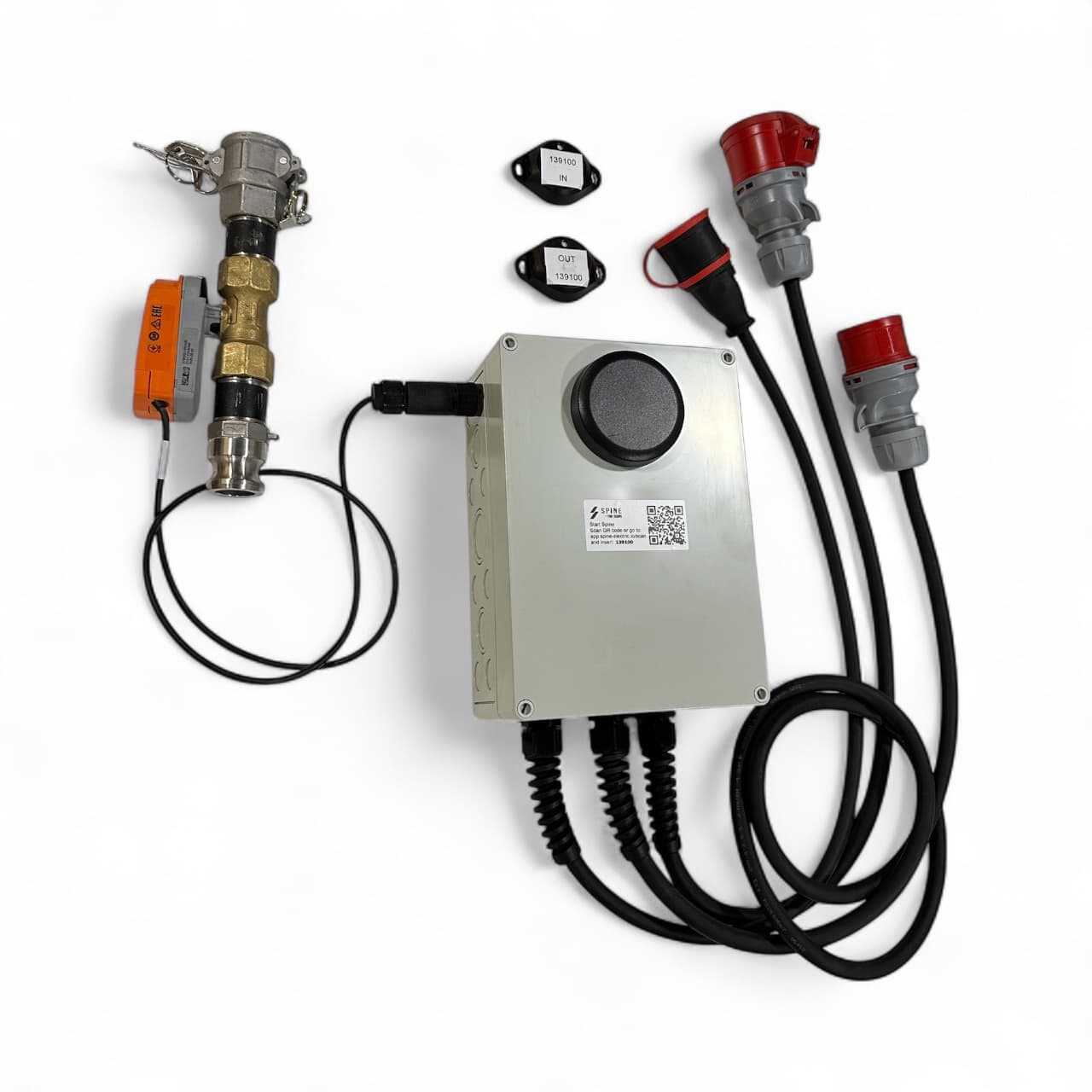
Spine Valve DN25
501340001Two ways to move forward
Request a quote
Know your heating needs and device count? Add Spine heating products to the quote cart and we’ll prepare a quote.
Go to products →Book a free 30-minute consultation
We’ll go through your site’s heating and drying needs and schedule, and figure out which configuration fits.
Book a time →Answers about heating control
Where is the valve installed?
On the flow or return line. The heater’s output can be looped through the unit, and the design is compact and site-ready. Commissioning is straightforward.
Do the sensors need cabling?
No. The RuuviTag sensors are wireless and attach with a magnet directly to the heater. Commissioning is fast and no fixed cabling is needed.
Can the heating plan be made before going to site?
Yes. Heaters are created in the app in advance and placed on the floor plan by dragging. The installer sees the plan on their phone in real time, and the device is paired with a QR code.
How can drying progress be proven afterwards?
All condition data is logged in the Spine service for the whole project, and reports can be produced by device or for the whole site. The same place also stores the devices’ inspection and testing documents.
Does Spine also work with cooling?
Yes. Heat and cooling production can be monitored via Belimo-based Aurora Block units, and Spine heating and cooling can be controlled automatically as needed.
Other Spine areas
All data flows into the same Spine app, so you can freely combine areas within the same site.
Electricity
Consumption, load, phase balance and voltage monitoring, plus reports.
Explore →Water
Remote water consumption reading and leak alarms; water shut-off with add-on devices.
Explore →Control
Generator load management plus remote control of lighting and equipment.
Explore →